

What the calling dashboard is telling you
How the impact panel and calling journey count calls, contacts and outcomes
Every calling session opens on a dashboard of numbers, split into OUR IMPACT SO FAR and YOUR CALLING JOURNEY, and Run a calling session covers the work those numbers are counting.
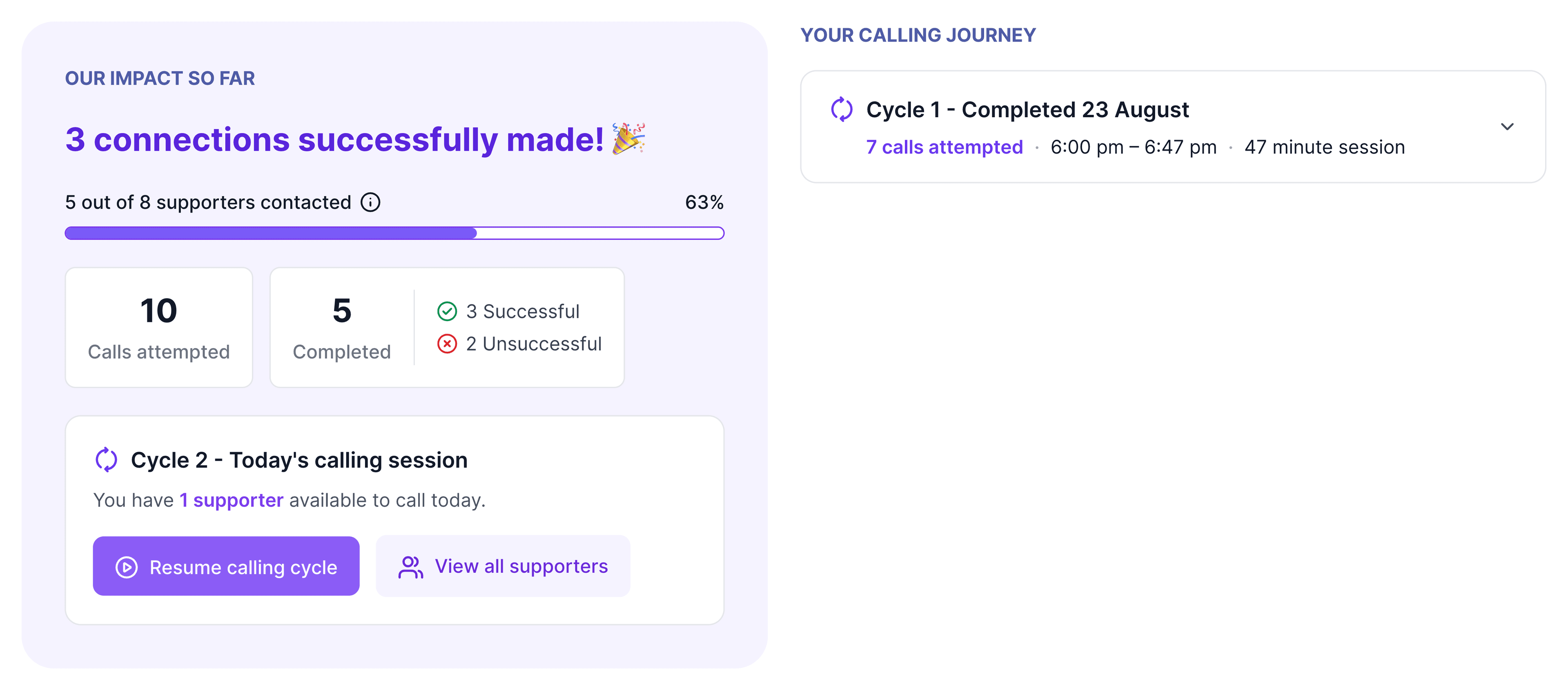
Two framings of the same work
| Panel | What it shows |
|---|---|
| OUR IMPACT SO FAR | The collective number, and the first thing you see: "3 connections successfully made!" |
| YOUR CALLING JOURNEY | Your own record of the cycles you have completed, each with its own attempts, time range and duration |
Why the numbers differ
| Number | What it counts |
|---|---|
| Calls attempted | Individual call attempts, including repeats to the same person |
| Completed | Supporters who now have a logged outcome |
| Successful / Unsuccessful | How those completed supporters split |
| Contact status | What happened on the call |
| Contact outcome | Whether the call achieved what you rang for, so somebody can answer, have a proper conversation, and still be unsuccessful because they said no. A high contact rate can sit alongside a low success rate for the same session |
In the example above, ten attempts produced five completions. That gap is your contact rate: at two attempts per contact, a list of two hundred is four hundred dials.
What counts as contacted
A supporter counts as contacted once they are marked done with an outcome, successful or unsuccessful, and neither dialling them nor them picking up counts on its own.
Where you log the contact
| Where you log it | What the dashboard does |
|---|---|
| A calling session, with No further contact attempts needed ticked | Stores the outcome against the session and counts the supporter as completed. It is the checkbox that feeds the connection count, the successful and unsuccessful split, and the per-cycle stats |
| A calling session, with the checkbox left unticked | Counts nothing. Calls attempted climbs all evening, because that counts dials, while Completed stays at zero, the progress bar does not move, and the headline still reads "0 connections made so far" |
| The call list directly | Offers no checkbox at all |
An unticked contact is still recorded, notes and tags and all, and it still counts in the group's Analytics > Calls. The progress bar on this dashboard counts across all cycles in the session. If your numbers look wrong, check that box first.
Why cycles exist
- A cycle is one pass through the queue, and supporters who did not answer stay on the list until a new cycle puts them back in front of you. A second cycle revisits your "no answer" supporters a few hours later without creating a whole new session.
- First-pass contact rates are low. The people you missed usually were not avoiding you, they were at work.
- The calling journey records each completed cycle separately, so you can compare a first cycle of many attempts and few connections against a shorter second cycle that converts a higher share.
A finished cycle means two different things
A cycle that ends on "All supporters have been called or are temporarily unavailable." can mean either of two things, so check the remaining count before you stop for the night.
- Everyone attempted: the cycle is done and a new one is the next step.
- Everyone temporarily unavailable, because they were called too recently: the queue refills shortly.
What the dashboard measures
The dashboard measures contact, and a successful outcome means the call reached its purpose without telling you whether the supporter agreed with you or turned up afterwards.
| What you compare | What a difference in connection rate tells you |
|---|---|
| Two lists called with the same ask | Something about the lists |
| The same list called with two different asks | Something about the ask. Call one issue per session to keep that comparison clean |
- Agree with your callers what gets logged for each response before the session starts, and cover No further contact attempts needed in the briefing. For what a call produced on your issue, read the contact status, any tags applied, and the notes on the supporter's profile.
- The dashboard is scoped to one session and to the person running it. For totals across every session, including call volumes, durations and outcomes, use the group's Analytics > Calls.