

Reconnect your NationBuilder nation
What the connection warning means, and how to restore syncing when it stops
If you're seeing a NationBuilder connection warning, the link to your nation has stopped working, your data isn't syncing, and an admin needs to reconnect it.
Admins only
Reconnecting is done under Settings > Configurations, which only admins can reach. If you're a captain or vice-captain seeing the warning, pass it to an admin.
What you'll see
The banner
A banner sits at the top of the page, and it follows you around the app deliberately.
- It reads NationBuilder connection needs attention.
- It explains "Your NationBuilder connection has stopped working. Reconnect to keep your data in sync."
- It carries a link, Go to settings to reconnect.
The NationBuilder tab
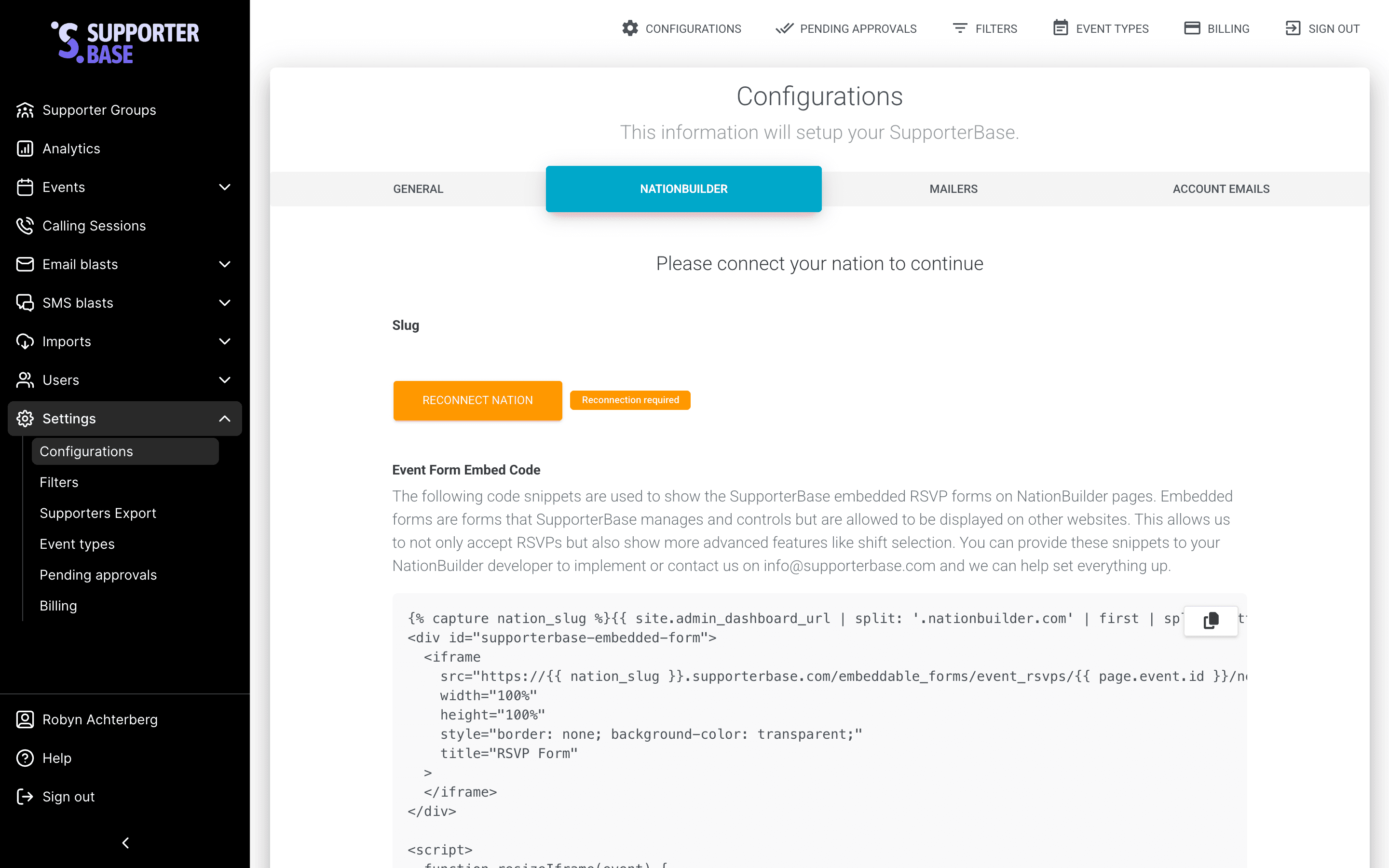
On the NationBuilder tab of Configurations, a Reconnection required badge appears next to the Reconnect nation button.
What stops while it's down
- Supporter changes made in NationBuilder won't reach SupporterBase.
- Changes made in SupporterBase won't reach your nation.
Nothing is lost, but the two drift apart until you fix it.
Reconnecting
Open the NationBuilder settings
Go to Settings > Configurations and choose the NationBuilder tab, or use the banner's Go to settings to reconnect link to go straight there.
Check your nation slug is set
Your nation's Slug must be filled in before a connection can start, and you'll be told "Set your nation slug before connecting" when you try it empty.
The slug is the name in your NationBuilder address: for example.nationbuilder.com, the slug is example.
Click Reconnect Nation
You'll be sent to NationBuilder to authorise SupporterBase.
Approve the connection in NationBuilder
Sign in to NationBuilder if prompted, and approve the request.
You need an account with permission to authorise apps for the nation. Hand this step to whoever administers your NationBuilder account if you don't have one.
Confirm you're back
You'll return to SupporterBase with a message confirming the nation is connected, and the warning banner and the Reconnection required badge both disappear.
If it doesn't work
| What you see | What it means |
|---|---|
| "Connection wasn't completed. You can try again." | The authorisation was declined or cancelled in NationBuilder. Start again and approve it. |
| "We couldn't verify that request. Please start the connection again." | The connection attempt couldn't be matched to your session, usually because it was left too long or started in another tab. Begin again from Configurations. |
| "Set your nation slug before connecting." | The nation slug field is empty. Fill it in first. |
| A message about no refresh token | Your NationBuilder app connected but didn't issue the credential SupporterBase needs to stay connected. This one needs us: contact info@supporterbase.com. |
After you reconnect
Check anything you changed while it was down
Reconnecting re-registers the link with your nation and syncing resumes, so changes made in NationBuilder are picked up again by the regular scheduled sync.
Changes made in SupporterBase while the connection was down may never have reached your nation, and reconnecting doesn't send them retrospectively. If the connection was broken for a while, spot-check a few supporters you edited during that window.
Why connections lapse
SupporterBase renews its authorisation automatically, so normally you'll never see this. It stops working when the renewal is refused, usually for one of two reasons:
- The app was removed in NationBuilder.
- The app's permissions were changed in NationBuilder.